学习记录6
较浅了解了ajax,promise,axiso,vue的一些基础知识。
以下是部分笔记或整理
ajax
作用与优势
前后端交互,异步执行
不需要刷新页面就可以更新数据,减轻服务端和带宽的负担
不同的请求方式
get 偏向获取
post 偏向提交
put 偏向更新全部
patch 偏向修改部分
delete 偏向删除信息
head 偏向获取服务器头的信息
option 偏向获取服务器设备信息
connnect 保留请求方式
promise
作用与优势
指定回调函数方式更灵活易懂。
解决异步 回调地狱 的问题。
Promise 表示承诺在未来的某个时刻可能会完成并返回结果,对于某些需要时间来处理结果的操作, 如用户登录、读取文件等, 可以使用 Promise 对象来执行异步操作
状态
当创建一个 Promise 对象时, 它的初始状态为 pending, 表示异步执行还未完成
当异步执行成功时, 会调用 resolve 函数把 Promise 对象的状态改变为 fulfilled, 可通过 then 方法来获取异步操作的结果
当异步执行异常时, 会调用 reject 函数把 Promise 对象的状态更改为 rejected, 可通过 catch 方法来处理错误
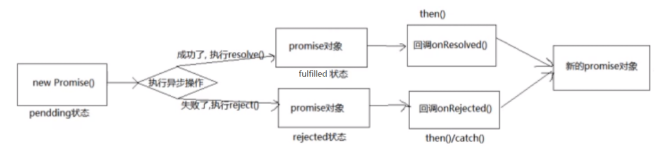
简单用例
let promise = new Promise((resolve, reject) => {
            //resolve("邮件发送成功")
            reject("邮件发送失败")
        }).then(result => {
            console.log("result:", result)
        }).catch(error => {
            console.log("error:", error)
        }).finally(() => {
            console.log("异步执行结束")
        })
axios
作用与优势
Axios 是基于 Promise 的网络请求库, 它可以发送http请求并接收服务器返回的响应数据
返回的是一个 Promise 对象
axios 可以完全替代原生 AJAX
用例
get
// 向给定ID的用户发起请求
axios.get('/user?ID=12345')
  .then(function (response) {
    // 处理成功情况
    console.log(response);
  })
  .catch(function (error) {
    // 处理错误情况
    console.log(error);
  })
  .finally(function () {
    // 总是会执行
  });

// 上述请求也可以按以下方式完成(可选)
axios.get('/user', {
    params: {
      ID: 12345
    }
  })
  .then(function (response) {
    console.log(response);
  })
  .catch(function (error) {
    console.log(error);
  })
  .finally(function () {
    // 总是会执行
  });
post
axios.post('/user', {
    name: 'John',
    age: 25,
    email: 'john@example.com'
  })
  .then(response => {
    console.log(response);
  })
  .catch(error => {
    console.log(error);
  })
  .finally(() => {
    // 总是会执行
  });
put
axios.put('/user/123', {  // 假设 123 是用户ID,用于指定更新的资源
    name: 'John Updated',
    age: 26,
    email: 'john.updated@example.com'
  })
  .then(response => {
    console.log('PUT 请求成功:', response);
  })
  .catch(error => {
    console.log('PUT 请求失败:', error);
  })
  .finally(() => {
    // 无论成功失败都会执行
  });
patch
axios.patch('/user/123', {  // 仅更新需要修改的字段
    age: 27  // 比如只更新年龄
  })
  .then(response => {
    console.log('PATCH 请求成功:', response);
  })
  .catch(error => {
    console.log('PATCH 请求失败:', error);
  })
  .finally(() => {
    // 无论成功失败都会执行
  });
delete
axios.delete('/user/123')  // 通常只需指定要删除的资源ID,无需请求体
  .then(response => {
    console.log('DELETE 请求成功:', response);
  })
  .catch(error => {
    console.log('DELETE 请求失败:', error);
  })
  .finally(() => {
    // 无论成功失败都会执行
  });
学习记录6
http://localhost:8090//archives/di-liu-zhou